Bulletin

January. Happy New Year. FREE Internet for Smart/Globe Even with Zero Load for Android and for PC/Laptop.
---------------------------------
*Visit Coolchura for news, trending topics, discussions and promos.
*Interested in blogging and making-money online? Try Colored Chalks
----------------------------------
*Utilize the
Search Blog Contents if you are looking for certain keywords. It really works! You can also try the Ctrl+F for more convenience.
Problem downloading? Use mirror links or click here for instructions.
Please use the comment form to report nonworking download links.

Monday, January 26, 2009

Flexirate from Smart

Smart Flexirate is up til May 31, 2009

To make calls, dial *88+(11-digit Smart/TNT number). Ex. *8809190000000

When you call up to 3 minutes, you will be charged P10.00.
For 5 minutes, P15. And for 20 minutes, P20.

It gets cheaper the longer you call.

Once registered, maintain one-peso balance to be able to make calls. Available only for Smart users. calls less than 3 minutes is still charged P10.

For more info, visit Smart Webpage

Like this post? Subscribe or Bookmark my posts!

Share/Save/BookmarkSubscribe

Wednesday, January 14, 2009

I Made it to Top One in Google's Search Results

I am a newbie blogger and still grasping the jargons of this new world. The SEO, html, java, ad placements, monetizing, index and many more have become part of my reading routines last Holiday. This post is kind of late now because my story happened during the Christmas week.

I started using the Google Webmaster Tools only last December for I was so focused on the designs (which I think still needs improvement). When I started using it, the only data available to me are the subscribers and the Top queries because Google haven’t been able to index this site. And on that Christmas week, I was surprised to see that two of my posts were hitting the top spot at Google while others are at number 2. How come?

As for my site status, i-Share is still a baby and its backlinks are about a hundred as well as the traffic each day. Most of my listed backlinks are from FEEDJIT and from STERNDAL’s blog. I was only able to exchange backlinks with the blogs found at my blogroll and only submitted my url to 15 blog directories.

Based from what I read from other people’s suggestions on increasing the SEO, they said that SEO depends on how many backlinks you have. The more there is, the greater chance of being included in the top 10 search results. Then, how did I made it?

I also checked my site’s Page Rank and it says 3! Weeee! Before, I was always given the NO DATA notice; that’s why I still don’t have the button. But now, I have the chance to include it on the widgets. On the other had, people are commenting that Page Rank is not an accurate measure for the SEO because it is only updated after long time intervals. That Google has a different algorithm to base the everyday results of their search engines. As a matter of fact, at the start of 2009, there had been changes on the Page Rank computation from Google and this had caused a drop to some site’s PR. While many people believe on backlinks, others theorized that SEO doesn’t solely depend on it; they are suggesting that there other factors such as the content which is affecting the result. Maybe that’s the side where I had weighed the most (naks!).

Now, ten of my posts are still on the top 10 while others are not showing on the results. Feedjit was able to give me hints on what people are searching so I constantly update the post to suit wider viewers. Still my traffic is at low but what’s important for me is the fact that people had reached i-Share through Googling. That’s the very reason I am now a blogger.

Update: i-Share is now appearing in Yahoo Search results! Yahoo!!

Like this post? Subscribe or Bookmark my posts!
Share/Save/BookmarkSubscribe

Tuesday, January 13, 2009

Recommended Free Audio/Video Players and Converters

The list of the best players and converters on the net is growing tremendously. When I say the best, these are the software which have everything you need (well, if not, MOST of the things that you need). With every software companies developing new products and updating their old ones, you might have a hard time choosing what you need. Or if not you, might just settle yourself with the pre-installed Windows Media Player in your computer.

I listed down some of the best players and converters that I had used already. Honestly, I frequently try new players to bring up some change in my laptop. I also download new themes and skins just to have fresh new look for it. Even if I don't download movies on the net, I also included some of the online converters out there.

Players
K-Lite Codec Player
This is a collection of codecs, directshow filters and tools. Codecs and DirectShow filters are needed for encoding and playing audio and video formats. K-Lite Codec Player doesn't need so much memory from your computer. It has the classic Windows Media Player look. It may be not good looking but it can play everything! I can load MP4, 3GP, FFDShow, MPEG, AVI and rmv formats.
This only works on Windows 2000/XP/2003/Vista
Download K-Lite Mega Codec Pack from FileHippo.com


AlShow

AlShow is the very customizable player I had tried. You can move and resize captions to fit your screen and even change the font, rotate the screen and most of all, I can capture video and audio segments. This is good for those who love to edit videos and audios. If the codec is not yet installed on your computer, it can directly download it.
Works only on Windows 98/ME/NT/2000/XP/2003. Needs 20 MB space, 128mb RAM.
Download AlShow

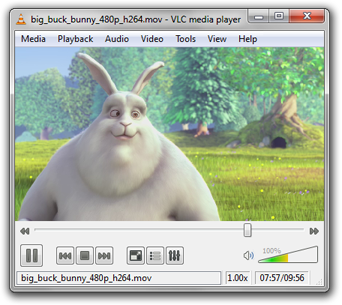
VLC media player
It is both a player and streaming server. It means you can watch video from your DVDs or use this player to watch online videos. VLC is lightweight and also classic looking. It caters Windows, Mac OS and Linux OS.
The link will direct you to their website and from there, choose your OS for download.
Download VLC


Converters
Video Convert Master
I only listed one since it has everything. No need to look for more. My friend gave it to me when we hosted a concert in our dorm.

VCM doesn't mean it only converts video files. The link provided is a folder on which it include the .exe to run the file. Just copy the folder on your local drive C:/Programs/. Then create shortcut on desktop using the "orange counterclockwise arrow" icon (vcm). If you want to uninstall it, just erase the folder and off you go. To convert, just indicate the source file and select the folder where you want to output it. Hit the format you want the file to be converted and wait.

It converts all files to video formats (AVI, MP4, MPEG, MOV, WMV, RM, SWF) and audio files(ASF, VOD, AAC, MP2, MP3, AMR and WMA).

I searched this on the net and it's not free so, I uploaded the one I have.
Download Video Convert Master


Online Converters
If you don't want to stream online and prefer to watch it at your leisure hours, you can first download the file. You only need the URL of it's location.

Vixy.net
The site lets you convert Flash videos/FLV files (youtube, myspace, etc.) to MPEG4 (AVI/MOV/MP4/MP3/3GP) files. You doesn't need to have an account to use this. Just enter the url of your videos and indicate what format you want it to output and download it after conversion.

Convertdirect.com


The service converts FLV files to AV/WMV/MP4/MOV/.MPG/3GP/MP3/AAC. The files are suitable for iPod, Zune, PSP, mobile phones and others. When you only want to download the original FLV file, e-mail ad input is not necessary. But when you need to convert the file, you have to provide them your e-ad because the download code will be sent there. This is kind of tedious.

Now, choose what you need!

Like this post? Subscribe or Bookmark my posts!
Share/Save/Bookmark
Subscribe

Friday, January 9, 2009

Unlimited Combos from Smart

Text and Call Combo 25
-Unlimited call to Smart/TNT from 11pm to 6am. To call, Dial *8654+12-digit TNT/Smart no.
-100 texts to Smart/TNT and 10 texts to Other networks.
-Valid for 1 day.
-Register anytime by texting C25 to 2827. Consumable.
-Maintain 1 peso balance.

Unlimited Combo 25
-1 day unlimited text
-3 min call to Smart/TNT na pwedeng hati-hatiin.
To call, dial *2819+12-digit Smart/TNT no.
-Valid for 1 day. Consumable.
-Maintain 1 peso balance
-Register anytime. Text COMBO25 to 258.

I haven't clarified the validity of the promos. Smart customer service is really unreachable. 24 hrs customer support,huh? Why is it I always hear the music for more than 5 mins? I think they are promoting the SAGOTAGAD text service. The service has errors in keyword input recognition, again they are truly unreachable! They should check this up.


Like this post? Subscribe to posts for free!
Share/Save/Bookmark
Subscribe

Wednesday, January 7, 2009

Upgrade your PSP CFW to 4.01 M33 (up to 5.00 M33-4)

I am a newbie with PSP thing so I only post things which I have tried. I have just upgraded my 3.71 M33 to 4.01 M33. Some say that you cannot directly upgrade your 3.71 M33 to that but proof is more powerful. This is a really easy tutorial. For those using PSP 3000, no hack for you since your PSP is still unhackable.

Disclaimer: I hold no responsibility in case you brick your PSP but as I mentioned above, the process is tried already. Do at your own risk.

What you need
Any PSP with CFW of at least 3.52 M33-4 for Fat and 3.60 M33 for Slim.
Plug your PSP into an electricity since we don’t want the installation to be interrupted due to low battery.
PSP USB cable
Download 4.01 M33 Update Mirror
Download the 4.01 Official SONY Update File

Procedure
1. Connect your PSP to computer and enable USB mode.
2. Extract 4.01 M33 file and copy the UPDATE folder to F:/PSP/GAME/. I am using F:/ but others call them ms0:/. Extract the 4.01 Official Sony Update file and rename the EBOOT.PBP file to 401.PBP. Copy the 401.PBP to the F:/PSP/GAME/UPDATE/ folder. Disable USB mode.
3. Go to the XMB of your PSP (this is the Menu where you browse your PSP) then Select GAME>Memory Stick>4.01M33 Update. The screen will turn black this is normal. Follow the instructions given in the screen. You will be taken to the Sony Update screen and do the update. Don’t turn off your PSP or cancel the Update for it can brick your PSP. Follow instructions that will appear on the update. It will restart your computer.
4. You now have the 4.01 M33 version. Isn’t that a cookie?
5.Next thing you have to do is install the 1.50 Kernel Add-on for you to enjoy 1.50 homebrews. This is optional but we want a better PSP. This is only applicable for FAT users. Download 1.50 PBP Add 1.50 Kernel file. Connect your PSP to computer and enable USB mode.
6. Copy 150.PBP file in the root of your PSP (F:/).
7. Download 1.50 Kernel Add-On for CFW 4.01 M33 and transfer this to F:/PSP/GAME4XX. Disconnect PSP from your computer. Go to XMB and navigate to GAME>Memory Stick>1.50 Kernel Add-on. Just follow again the instructions that will pop onscreen until the installation is complete. You now have a better PSP.
8. If you have homebrews files, you will have to paste them in F:/PSP/GAME150 folder.

To update your new CFW to M33-2, you will have to download the M33-2 Update extract and replace the UPDATE folder in F:/PSP/GAME/. Go again to the XMB of your PSP and Select GAME>Memory Stick>4.01M33-2 Update. Run the update and just follow the instructions that will appear onscreen. It will restart again and now you have your 4.01M33-2 CFW. This process goes with other upgrading versions.

Now that you have the 4.01 M33-2, there’s a newer version for you, the CFW 5.00 M33-4. The least requirement is 4.01 M33-2. Download 5.00M33-4 Update Mirror and unzip it. Copy the UPDATE folder and replace the UPDATE folder in F:/PSP/GAME/. Download official Sony Update File. Transfer the official Sony update file also in the UPDATE folder. Then run the same process you did before. All homebrew files go to F:/PSP/GAME5XX.

There is a 1.50 Kernel Add-on for 5.00 M33 for FAT user. Download here. Connect your PSP via USB and copy the file to F:/PSP/GAME5XX. Unplug your PSP and Go to XMB>GAME>Memory Stick and Select the 1.50 Kernel Add-on update. Follow instructions onscreen. Your PSP is no longer better, it’s in its best.

Feels like an achievement, huh?

Credits to Dark_Alex for the CFW and tutorial. Also exophase forum and dl.qj.net for the files.

If you have questions/clarifications/comments, just leave a message at the bottom of this post. If I can’t answer them, maybe others can.

Like this post? Subscribe to posts for free!
Share/Save/Bookmark
Subscribe

About the Author

My photo
My field is in research and analysis. And it is to my experience that having answers in a bunch is a rare find. That's why I started blogging. To provide answers in one gulp as much as possible. Follow my posts by clicking the RSS Feed. Your donation is highly appreciated. If you want to exchange links, contact me or use the comment form.
Visit my personal page

Blog Followers

  © Blogger template Spain by Ourblogtemplates.com 2008

Back to TOP